# Documentation
[](#)
## API Integration Guidelines
This section introduces essential patterns and technical rules that apply across all products and APIs.
### Authentication
Allianz Trade APIs are secured using OAuth2 Bearer tokens. You must provide a valid token to authenticate on Allianz Trade API endpoints.
Identity Provider (IDP)
Authentication: use your API key to generate a Bearer access token, enabling secure calls to Allianz Trade APIs.
[Read tutorial](/docs/tutorial-idp)
### API Threshold Limits
The number of calls is restricted to **1500 calls per 5 minutes per IP address for all APIs except Cover v3 API**. If you exceed this threshold, the API will return **HTTP 403**, then retry after **30 seconds**.
If you frequently hit this limit, we recommend **optimizing your integration** to reduce unnecessary calls and ensure smoother performance.
### JobId
Our Job API manages the asynchronous processing of our POST, PATCH, and DELETE calls. Use the jobId returned in the response to repeatedly call the Jobs API endpoint, polling until the status changes from pending to processed. Once processed, use the resourceUrl provided to retrieve the coverStatus of your request.
### Webhook
When requesting a cover, a jobId will be returned by API. Instead of polling Jobs endpoint, you could implement a webhook notification to automatically receive updates when specific events occur. Eliminating the need for continuous polling.
#### As described in the specifications, there are 2 types of notifications (technical/ functional), we recommend implementing the functional notification.
#### **Technical Notifications**
By default, a notification will be sent as soon as the job has been processed by the system. It means that the cover has been technically created in our system. The **notification body will contain the cover.**
#### **Functional Notifications**
Activated by the extendedNotification option, the goal of this notification is to notify the client as soon as a decision (refused for example) has been taken about the coverRequest. This **notification body will contain the cover request**.
This notification is sent only in some conditions:
- the coverRequest must be pending
- the technical notification has been sent
#### To implement this mechanism, a few steps are necessary:
#### **Step 1: Whitelisting**
Our expert team whitelists your domain. Please send a request to api@allianz-trade.com with your company and domain information.
#### **Step 2: Configuration**
Configuration of callback URL
##### **Technical Notification**
In Headers of your Post call, please leave your callback URL and timeToLive. This endpoint must be in **HTTPS**, and this object **is stringified and base 64 encoded**.
```json
{
"callbackUrl": "https://client_url.com/Webhook",
"timeToLive": 24
}
```
"Example: {"https://btsapi-uat.flore-logistics.com/v1/api/ehtest/testing/HFPRIX/testPost", "timeToLive": 24}"
#### **Functional Notification**
```json
{
"callbackUrl": "https://client_url.com/Webhook",
"timeToLive": 24, extendedNotification: true
}
```
"Example: {"https://btsapi-uat.flore-logistics.com/v1/api/ehtest/testing/HFPRIX/testPost", "timeToLive": 2, extendedNotification=true }"
#### Step 3: Security
This endpoint is protected in our system with access rights and encoded. Your IP is whitelisted.
##### To authenticate our response, we recommend:
- Whitelisting our IP address **3.68.181.76, 3.71.223.78, 3.75.2.187** (same IP for both test and production environment)
- Implementing a pre-signed URL
---
#### Detailed Overview of our Webhook Service
In the documentation, it is mentioned that Custom-Webhook must contain an encoded URL. This URL must be provided to Allianz Trade to be whitelisted.
##### Default Webhook Retry Configurations
What are the default settings for webhook retries on your platform? Specifically, could you provide details on the number of automatic retry attempts and the criteria used to mark a webhook delivery as failed?
We scheduled 3 calls every 30 seconds (1 initial call then 2 retries). If we don’t succeed to call your URL, we receive an alert then we will be able to notify you.
If we successfully reach your URL, you might receive an error code as specified in the documentation:
| errorType | string The error type. Indicates if the problem is within the user's request (a Functional Error) or if it is rather a Technical Error |
|---|---|
##### Multiple Endpoints Configuration
Is it possible to configure multiple endpoints to handle the same webhook events?
Currently the webhook service is available for POST/riskinfo/v3/covers/
| Custom-Webhook | object (Webhook) The callback information to be stored by the server to call back the client when the response will be available. This endpoint must be in HTTPS This object is stringified and base 64 encoded to be passed in the header.. External URLs must be provided to be whitelisted. The callback information provides the jobId to be matched with your request. |
|---|---|
##### Dashboard Visibility for Webhook Status
Our developer portal doesn’t have a feature with a dashboard where users can view detailed information about the status of their webhooks, distinguishing between successful and failed deliveries. It is up to the users to develop internally.
##### What is the format of the data I should receive?
In the specifications of our APIs, under the Callbacks / POST / request body schema: you could find the job-id and the business object (Cover or Cover request) or the error sent back to the client.
### Pagination
Any resource that could return a large, potentially unbounded list of resources in its `GET` response implements pagination using the patterns described here.
Sample URI path: `/accounts?pageSize={pageSize}&page={page}`
Clients MUST assume no inherent ordering of results unless a default sort order has been specified for this collection.
#### Pagination in a GET Context: Query Parameters
`pageSize`: A non-negative, non-zero integer indicating the maximum number of results to return at one time. This parameter:
- optional for the client to provide.
- has a default value, when the client does not provide a value, defined by the API provider. If no value is specified, the default value for pageSize is equal to 20.
- If the `pageSize` is higher than the number of results, the API will return an HTTP status 200 and the real number of results in the header response parameter `Total-Items` if the `totalRequired` is set to true.
- If the `pageSize` is higher than the default value, the default value is used instead.
- If the `pageSize` is negative or null, a 400 Bad request error is returned.
`page`: A non-negative, non-zero integer representing the page of the results. This parameter:
- Optional
- Has a default value of 1 for when the client does not provide a value.
- If the `page` parameter is negative or null, the default value equal to 1 is used instead.
- If a page number is too large - for instance, if there are only 50 results, but the client requests `pageSize=100&page=3` - the resource responds with the HTTP status code `200 OK` and an empty result list.
`totalRequired`: A boolean indicating total number of items (`Total-Items`) and pages (`Total-Pages`) are returned in the response. This parameter:
- is optional
- has a default value of `false`.
- may be used by the client in the very first request. The client may then cache the values returned in the response to help build subsequent requests.
- is only implemented when it improves API performance and/or is necessary for front-end pagination display
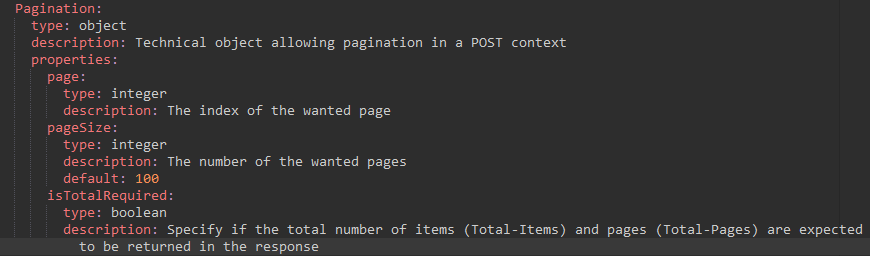
#### Pagination in a POST context
The request object used in the POST body has to contain a new attribute named "pagination" of type object Pagination defined as following
#### Response Properties
The response body contains an array of the expected objects. The response is common to the GET and POST context.
The response headers **SHOULD** contain (Unless there are performance or implementation limitations) the following parameters
If the query contains `page` and `pageSize` parameters, the response will contain
`Total-Items` **SHOULD** be used to indicate the total number of items in the full result list, not just this page.
- If `totalRequired` has been implemented by an API, then the value **SHOULD** only be returned when `totalRequired` is set to `true`.
- If `totalRequired` has not been implemented by an API, then the value **MAY** be returned in every response if necessary, useful, and performant.
- If present, this parameter **MUST** be a non-negative integer.
- Clients **MUST NOT** assume that the value of `Total-Items` is constant. The value **MAY** change from one request to the next.
`Total-Pages` **SHOULD** be used to indicate how many pages are available, in total.
- If `totalRequired` has been implemented by an API, then the value **SHOULD** only be returned when `totalRequired` is set to `true`.
- If `totalRequired` has not been implemented by an API, then the value **MAY** be returned in every response if necessary, useful, and performant.
- If present, this parameter **MUST**be a non-negative, non-zero integer.
- Clients **MUST NOT** assume that the value of `Total-Pages` is constant.
The value **MAY** change from one request to the next.
### Sorting
Results could be ordered according to sorting related instructions given by the client. This includes sorting by one (or more if you want to have a secondary, tertiary, … filter) specific field's value and sorting order (ascending or descending).
They are two cases, either we are in a context of a search using a GET or a more complex search using a POST
#### Sorting in a GET context
The “sort” parameter contains a list of couples keys (the field name), values (asc, dsc) separated by a “,”. The key and the values are separated by a “\|” : {fieldName}\|{asc\|dsc},{fieldName}\|{asc\|dsc}
For instance: /accounts?sort=birthDate\|asc,zipCode\|dsc.
#### Sorting in a POST context
Your request object used in the POST body has to contain a new attribute named "sort" (or "sorts" if there are more than one sorting criterion) of type object Sort.
#### Common context
If the field name doesn't match with any attributes in the list of the returned business objects, it is ignored.
If the sorting value is not equal to asc or dsc, the default value asc is used